





 asdar.id menyediakan Member Premium Download untuk download file tanpa embel-embel iklan dan halaman, apa lagi harus menunggu timer yang begitu lama. Dengan berlangganan Member Premium Download, semua file dapat didownload dengan singkat langsung menuju ke sumbernya!, klik DISINI untuk DAFTAR atau DISINI untuk LOGIN :-) Jika ada pertanyaan silahkan hubungi Admin DISINI. Untuk cara download file Member Free Download, bisa membaca Tutorial Download yang ada dibawah Timer (halaman Safelink) saat menekan tombol download.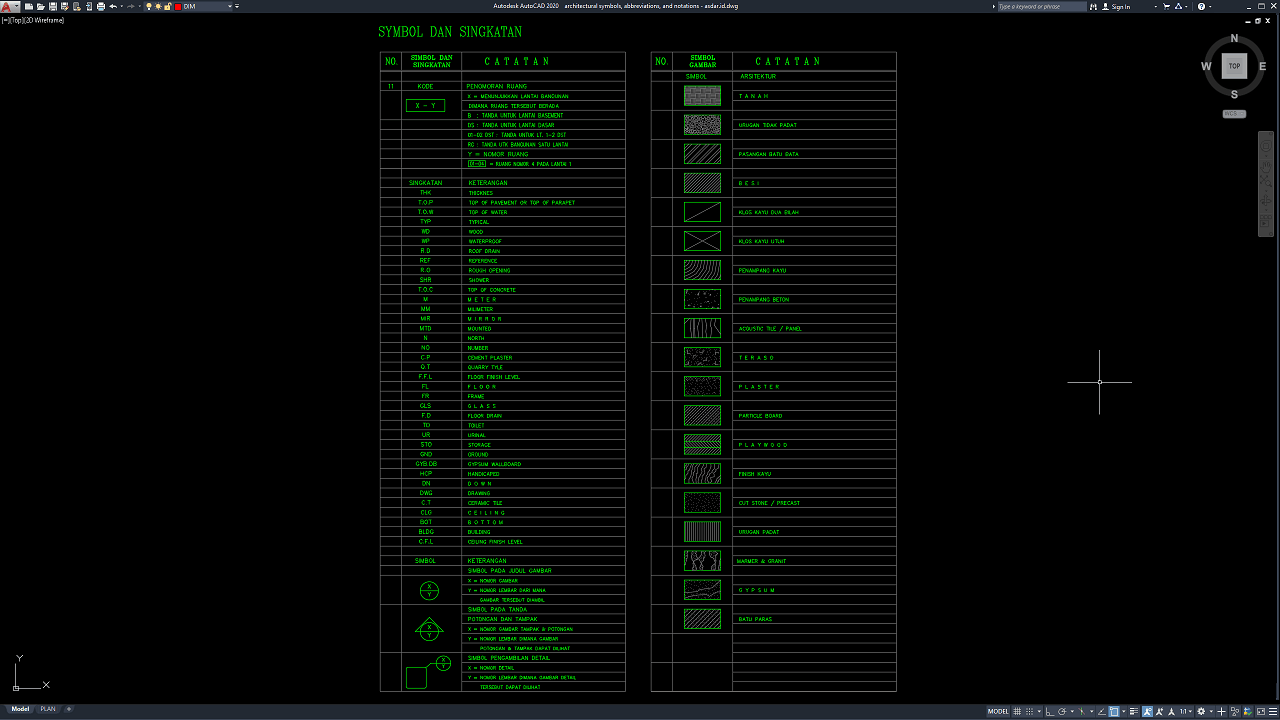
Architectural drawings use standardized symbols, abbreviations, and notations to communicate building information clearly and accurately. Whether you are an architect, civil engineer, interior designer, construction professional, or architecture student, understanding these technical references is essential for preparing and interpreting professional construction drawings.
This Architectural Symbols, Abbreviations, and Notations DWG AutoCAD resource provides a practical reference for architectural drafting, material identification, and construction documentation.
What Are Architectural Symbols, Abbreviations, and Notations?
Architectural symbols, abbreviations, and notations are standardized graphic elements and technical labels used in architectural drawings to represent building components, identify materials, indicate dimensions, and communicate construction requirements. They help professionals interpret complex design information without relying entirely on lengthy written descriptions.
In AutoCAD, these elements can be organized into reference tables within a DWG file, making them convenient to access, edit, and reuse across different architectural projects. A well-organized drawing reference can improve consistency between floor plans, elevations, sections, and construction details.
Architectural drawing references generally include three main categories:
- Architectural symbols: Graphic representations used to identify rooms, drawing references, sections, elevations, and enlarged details.
- Architectural abbreviations: Shortened technical terms used to describe building components, materials, measurements, and construction elements.
- Architectural notations: Labels and reference marks that communicate drawing locations, material information, and relationships between different views.
Together, these elements form an important part of architectural drafting standards and construction drawing documentation.
Functions of Architectural Symbols, Abbreviations, and Notations
Architectural drawing references serve several important functions throughout the building design and construction process.
1. Improve Drawing Readability
Symbols and abbreviations help simplify technical drawings by reducing unnecessary text while preserving essential information. This allows architects, engineers, contractors, and other project stakeholders to review drawings more efficiently.
2. Identify Building Materials
Material hatch patterns help distinguish different materials in architectural sections and construction details. Common examples include brick masonry, concrete, soil, timber, plaster, plywood, gypsum, and stone. These patterns provide visual information that supports material identification and drawing interpretation.
3. Establish Consistency Across Drawings
Using a consistent set of symbols and abbreviations helps maintain uniformity across architectural floor plans, elevations, sections, and detail drawings. Consistency is particularly important for projects involving multiple designers, consultants, and construction teams.
4. Support Construction Documentation
Architectural notations help connect a drawing to its corresponding detail, section, or elevation. Reference symbols can direct readers to other views where building components are illustrated in greater detail.
5. Improve CAD Drafting Efficiency
A reusable AutoCAD DWG reference can reduce repetitive drafting work. Designers can consult or adapt the symbol and abbreviation tables when preparing new drawings, provided that the selected references are appropriate for the project and follow the required drafting conventions.
Download Architectural Symbols, Abbreviations, and Notations DWG AutoCAD
Detailed Architectural Symbols, Abbreviations, and Notations DWG AutoCAD drawings provide useful technical references for understanding the graphic language used in architectural drafting and construction documentation. These drawings are particularly useful for architects, civil engineers, interior designers, CAD technicians, contractors, architecture students, and construction professionals who need to interpret architectural symbols, technical abbreviations, drawing references, and building material representations.
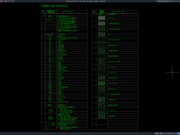
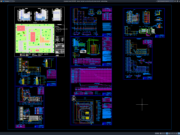
As shown in the uploaded drawing, the CAD sheet presents architectural symbols, abbreviations, technical notations, and material hatch patterns arranged in organized reference tables. The left table contains room numbering codes, drawing reference symbols, section and elevation markers, detail callouts, and common architectural abbreviations such as THK, T.O.P, T.O.W, TYP, WP, R.D, REF, and F.F.L. The right table illustrates material hatch patterns for soil, brick masonry, concrete, timber, acoustic panels, plaster, plywood, gypsum, stone, and other building finishes. Together, these references help users identify drawing annotations, distinguish construction materials, and interpret architectural information more consistently.
These AutoCAD DWG references can support architectural drafting, construction detailing, material identification, drawing coordination, and the preparation of technical documentation. The symbols help readers locate related plans, sections, elevations, and enlarged details, while the abbreviations simplify drawing annotations and the hatch patterns communicate material information in sectional views. The organized tables also provide a convenient reference for CAD technicians and designers who want to maintain consistent symbols, terminology, and graphic conventions across architectural drawing sheets.
Detailed AutoCAD DWG files allow users to review and, where appropriate, adapt architectural symbols, abbreviations, notations, and material patterns according to specific project requirements. This drawing serves as a useful reference for architectural drawing symbols, AutoCAD architectural abbreviations, construction drawing legends, architectural notation standards, material hatch patterns, CAD drafting references, building material symbols, architectural construction details, technical drawing documentation, and architectural DWG files.
Before using these references in professional construction documents, all symbols, abbreviations, hatch patterns, text sizes, and drawing conventions should be checked against the project specifications and applicable drafting standards. Abbreviations and graphic symbols may vary between organizations, disciplines, and countries, so their meanings should be clearly defined in the drawing legend. This DWG file should be treated as an architectural drafting reference that supports drawing interpretation and documentation rather than as a complete construction drawing set.
This drawing is provided in .dwg format, which means you can open it directly using the latest version of AutoCAD or an older version, such as AutoCAD 2004. You can also edit the drawing to modify it according to your preferences or design requirements. The captions in the images are in a mix of English and Indonesian, so you may need to translate them into your own language to understand them.
For those of you who prefer a simpler and faster download experience on asdar.id, I also provide a Premium Member Download service that allows direct access to the original file. This way, you will not be disturbed by excessive advertisements or multiple redirect pages during the download process. If you are interested, please register HERE. Please download the Architectural Symbols, Abbreviations, and Notations DWG AutoCAD file below:
Architectural Symbols, Abbreviations, and Notations DWG AutoCAD
| Google Drive | DOWNLOAD[55.66KB] |
| Mediafire | DOWNLOAD[55.66KB] |
Rar password: www.asdar.id
Important Note: If you encounter a problem where the WinRAR file cannot be extracted or appears corrupted, the solution is to update the WinRAR application on your computer to the latest version. Download the latest version of WinRAR here.
If you would like to copy this article, please include the original source because I have seen some blogs repost the content without providing proper credit. Otherwise, please rewrite it using your own words. Respect and appreciate the work and effort of others.
Architectural Symbols, Abbreviations, and Notations DWG AutoCAD is a practical reference for understanding the graphic language used in architectural drawings. By bringing together architectural symbols, technical abbreviations, drawing reference marks, and material hatch patterns, this type of DWG resource can help improve drafting consistency, drawing readability, and construction documentation workflows.
Whether you are an architect, CAD drafter, interior designer, construction professional, or student, an organized architectural legend can make technical drawings easier to prepare and interpret. Before using the file in a project, verify its abbreviations, symbols, hatch patterns, scale, and compatibility with the applicable drafting conventions.
Use this architectural DWG reference as a starting point for more consistent CAD documentation, and adapt its contents to meet the specific requirements of each project.