





 asdar.id menyediakan Member Premium Download untuk download file tanpa embel-embel iklan dan halaman, apa lagi harus menunggu timer yang begitu lama. Dengan berlangganan Member Premium Download, semua file dapat didownload dengan singkat langsung menuju ke sumbernya!, klik DISINI untuk DAFTAR atau DISINI untuk LOGIN :-) Jika ada pertanyaan silahkan hubungi Admin DISINI. Untuk cara download file Member Free Download, bisa membaca Tutorial Download yang ada dibawah Timer (halaman Safelink) saat menekan tombol download.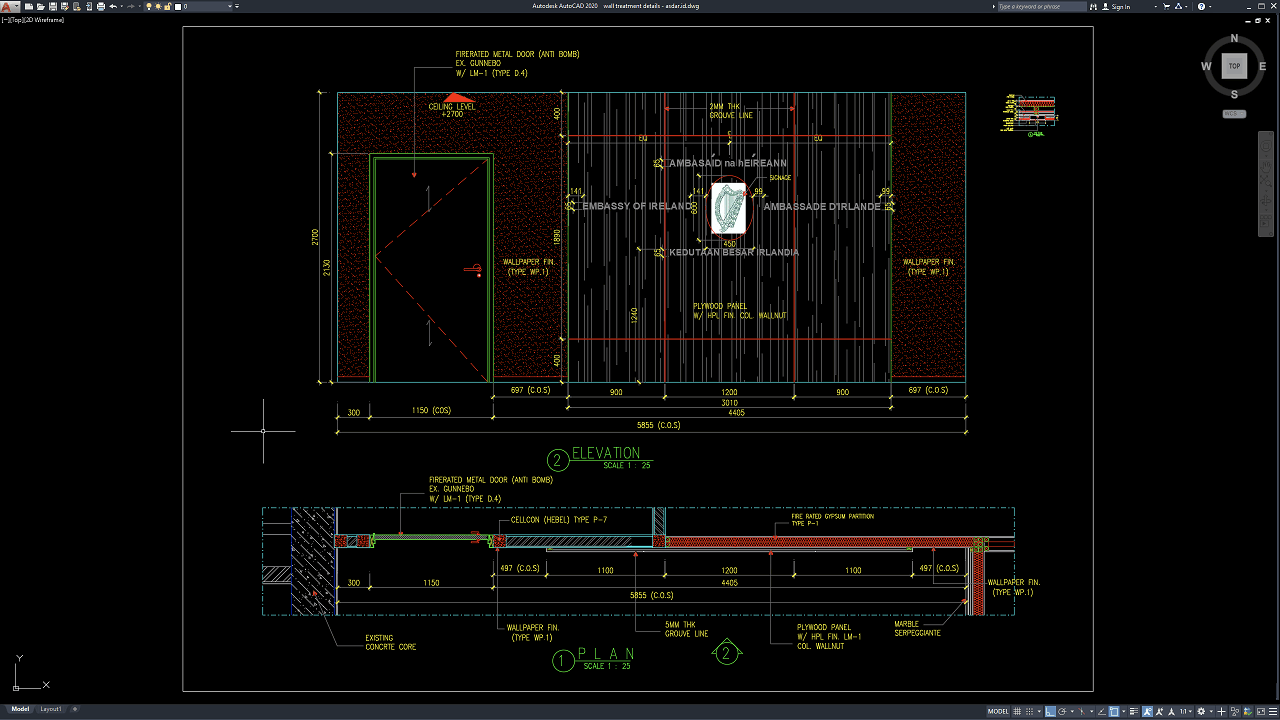
Wall treatment is an important part of interior architectural design because it determines how a wall looks, performs, and integrates with doors, ceilings, floors, furniture, signage, lighting, and other building components. A well-developed wall treatment can transform a plain partition into a functional architectural feature through the use of decorative panels, wallpaper, timber finishes, HPL, grooves, stone, metal trims, gypsum systems, and other materials.
In this article, we share a reference for Wall Treatment Details DWG AutoCAD that can be useful for architects, interior designers, fit-out contractors, joinery specialists, quantity surveyors, BIM coordinators, CAD technicians, construction managers, developers, and architecture students.
The drawing can provide a practical reference for interior wall treatment design, decorative wall detailing, wall panelling, custom joinery, commercial interior design, BIM coordination, interior fit-out cost estimation, quantity takeoff, and architectural construction documentation.
What Is Wall Treatment?
A wall treatment is any architectural or decorative system applied to an existing or newly constructed wall to improve its appearance, durability, acoustic performance, protection, or functional value.
Wall treatment can range from simple paint or wallpaper to more complex systems involving plywood backing, HPL panels, timber veneer, decorative grooves, stone cladding, metal trims, acoustic panels, or custom-made joinery.
Unlike ordinary wall finishing, a detailed wall treatment often combines several materials and construction layers within one elevation.
For this reason, professional drawings are important to communicate how the materials are arranged, joined, supported, and coordinated with surrounding architectural elements.
Importance of Wall Treatment Details
Accurate Wall Treatment Details DWG AutoCAD drawings help designers and contractors understand the relationship between decorative panels, wall finishes, doors, partitions, ceilings, floor levels, signage, joints, trims, and backing materials.
Small dimensional errors can become visually obvious when repeated modules are installed across a large wall.
A misaligned groove, incorrectly positioned panel joint, or poorly coordinated door opening can affect the overall appearance of the interior.
Detailed drawings allow the project team to resolve these issues before fabrication and installation begin.
They can also help quantity surveyors and contractors calculate materials more accurately and reduce unnecessary site modifications.
Download Wall Treatment Details DWG AutoCAD
Proper Wall Treatment Details DWG AutoCAD drawings are essential for accurately coordinating decorative wall finishes, plywood panels, HPL surfaces, wallpaper zones, groove patterns, door openings, wall partitions, and transitions with adjacent architectural materials within interior fit-out projects. Architects, interior designers, joinery contractors, fit-out specialists, quantity surveyors, BIM coordinators, and CAD technicians must carefully coordinate panel dimensions, material thicknesses, joint positions, finished levels, signage locations, and door interfaces to achieve a clean, consistent, and constructible wall treatment installation.
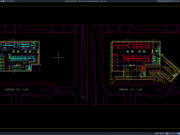
Detailed drawings such as wall treatment elevations, decorative panel layouts, wall finish plans, groove-line details, door interfaces, material transitions, and dimensional references help design and construction teams understand the complete interior wall composition before fabrication and installation begin. As shown in the drawing, the elevation features a central plywood panel with walnut-colored HPL finish, divided by decorative groove lines and coordinated with wall-mounted signage, while wallpaper finish is applied to the adjoining wall areas. The drawing also includes a fire-rated metal door, ceiling-level references, detailed horizontal and vertical dimensions, and clearly defined panel modules that control the overall interior composition.
Incomplete or inaccurate Wall Treatment Details may result in misaligned panel joints, inconsistent groove spacing, incorrect material transitions, poorly coordinated door frames, misplaced signage, unsuitable panel dimensions, and costly interior rework. Accurate architectural and joinery documentation, together with proper coordination between architects, interior designers, fabricators, contractors, quantity surveyors, and site teams, is therefore important for achieving a visually refined, durable, and professionally finished wall treatment system.
Detailed AutoCAD DWG files also allow designers and contractors to review and modify panel widths, groove locations, wallpaper zones, door positions, material interfaces, wall thicknesses, and other interior construction details according to specific project requirements. The plan view shown further identifies relationships between the existing concrete core, fire-rated gypsum partition, plywood panel with HPL finish, wallpaper finish, and marble Serpeggiante, providing a practical reference for interior wall treatment design, decorative wall panelling, custom joinery coordination, material transition detailing, fit-out construction documentation, and architectural drafting.
For those of you who prefer a simpler and faster download experience on asdar.id, I also provide a Premium Member Download service that allows direct access to the original file. This way, you will not be disturbed by excessive advertisements or multiple redirect pages during the download process. If you are interested, please register HERE. Please download the Wall Treatment Details DWG AutoCAD file below:
Wall Treatment Details DWG AutoCAD
| Google Drive | DOWNLOAD[577.74KB] |
| Mediafire | DOWNLOAD[577.74KB] |
Rar password: www.asdar.id
Important Note: If you encounter a problem where the WinRAR file cannot be extracted or appears corrupted, the solution is to update the WinRAR application on your computer to the latest version. Download the latest version of WinRAR here.
If you would like to copy this article, please include the original source because I have seen some blogs repost the content without providing proper credit. Otherwise, please rewrite it using your own words. Respect and appreciate the work and effort of others.
Wall Treatment Details DWG AutoCAD drawings provide practical references for understanding how wallpaper, decorative plywood panels, HPL finishes, groove lines, gypsum partitions, doors, signage, stone skirting, and surrounding architectural elements can be integrated into a complete interior wall composition.
Accurate CAD documentation can improve collaboration between architects, interior designers, joinery contractors, fit-out specialists, MEP consultants, BIM coordinators, quantity surveyors, and construction managers. It can also support more reliable wall treatment quantity takeoff, interior fit-out cost estimation, custom joinery budgeting, material procurement, shop drawing preparation, BIM coordination, fabrication planning, and construction quality control.
A successful wall treatment should combine attractive appearance with durable materials, precise setting-out, practical installation, coordinated building services, and long-term maintainability. When these elements are properly detailed, the finished wall can become a distinctive architectural feature while remaining efficient to fabricate, install, and maintain.